
Note: The article is not up to date; as of 1/4/17 a new and improved statistics system was launched, details in a separate article.
If you own a website or an online store, you surely know the importance of monitoring what happens on your site:
- How many visitors are on your site?
- Is Google promoting you in the search engines?
- What are the most active hours on your site?
- Where do most visitors to your site come from?
- Is your site backed up?
- What is the nearest backup point?
- Has your site been the target of a break-in attempt?
Tracking your site's data can help you manage your site more correctly and more intelligently.
For example, if you are used to publishing posts usually at 12:00 noon, when in fact you don't know that the activity on your site peaks between 19:00 and 20:00, this is very important data for your success.
Or, for example, there is a plugin on your site that blocks Google's robots from entering (this would hurt your search ranking on Google), and you actually didn't know this detail, which is very important data for you.
Tracking site data and acting accordingly is a tremendous force multiplier for site managers, and it is a natural step for every site owner who wants to make their site more successful.
Now that we have explained the power of Tracking your site data, we would all agree that the theoretical part is nice and wonderful, but the practical part is an impossible task for site managers.
Tracking your site's data in a professional and organized way requires devoting a great deal of time, on a daily basis, over the long term.
This is why we developed, for uPress customers, the great tool
Daily Hosting Report
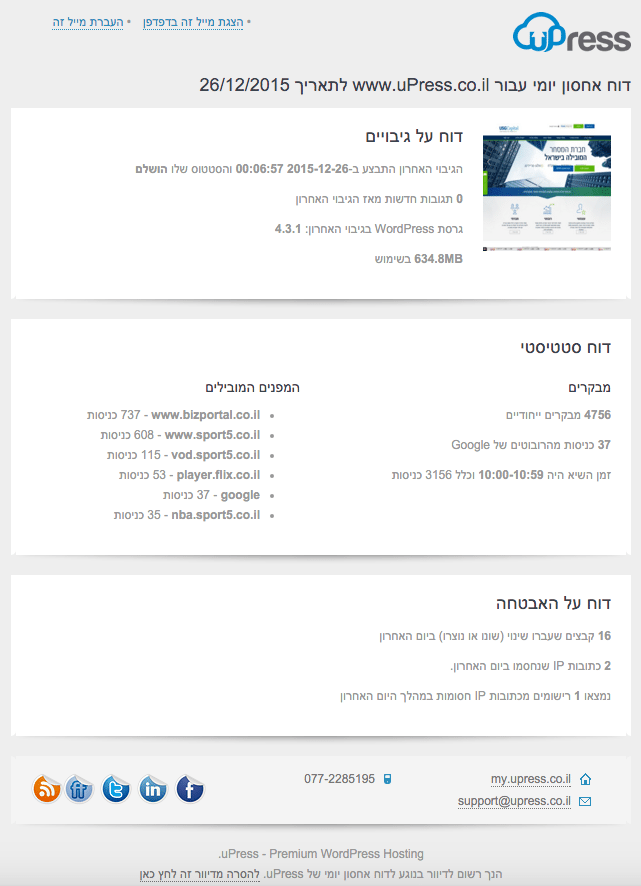
The daily hosting report is a file that arrives by email directly to the customer, gathering all the information relevant to the site manager in one place, on a computer or a phone,
in one place, on a computer or phone, without clicking unnecessary links and without working hard.
 Original Hebrew WordPress interface. Follow the English instructions in this article; labels and positions may differ in newer versions.
Daily hosting report – as it arrives by email to uPress customers
An explanation of the daily hosting report
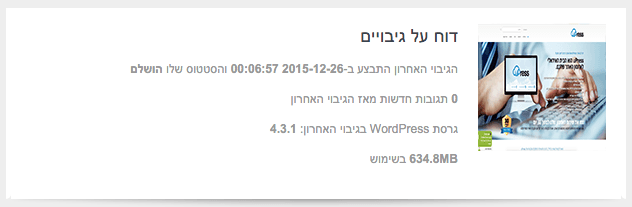
In the first part of the report you can get information about your site's backup.
The last backup was performed on 2015-12-26 00:06:57 and its status is completed,
This is the date and time when your site's most recent backup point was made, and its status accordingly.
If the status is Completed, the backup was performed perfectly and can be restored at any given moment.
0 new comments since the last backup
If there are comments about your latest backup – they will appear in this line.
WordPress version in the last backup: 4.3.1
This is the WordPress version that was in use at the time of the last backup.
634.8MB in use
This is your site's size, so that you can track your site's size relative to the size of your hosting package.
 Original Hebrew WordPress interface. Follow the English instructions in this article; labels and positions may differ in newer versions.
In the second part of the report you can get information on the number of visitors to your site. Where they came from, the peak activity time on the site, and how many hits were made by Google robots.
4756 unique cases
This is the number of visitors who visited your site, where a visitor who returns to the site several times is counted as one visitor.
37 visits from Google's robots
This number represents the number of visits made by Google's robots in the last 24 hours.
If this number is 0, there is a good chance that there is a problem that needs to be handled.
The peak time was 10:00-10:59 and included 3156 visits
This is a very important piece of data you can get about your site's activity, and at this hour it is recommended to release articles or promotions that you want to expose to the largest number of visitors.
Top referrers
In this paragraph you can get data on how many visits reached your site, and from which site the visitors were referred to your site.
Based on this data you can strengthen relationships, strong or weak, according to your site's activity.
 Original Hebrew WordPress interface. Follow the English instructions in this article; labels and positions may differ in newer versions.
In the third part of the report you can get information about the security of your site: a number of files that were modified, IP addresses that were blocked following detection of an intrusion attempt, and information about them.
16 files that were changed (modified or created) in the last day
This figure shows the number of files that were changed or created. If you haven't made any changes to your site in the last day and the figure shows otherwise, you need to check it.
2 IP addresses blocked in the last day
1 records from blocked IP addresses were found during the last day
This figure shows the number of IP addresses that were identified by the system as a hacking attempt and blocked, and the record of information about them.
 Original Hebrew WordPress interface. Follow the English instructions in this article; labels and positions may differ in newer versions.
In summary
Tracking your site's data in a professional and organized way requires devoting a great deal of time, on a daily basis, over the long term.
uPress's daily hosting report provides very important data for site managers. This data can help you understand the mindset, activity hours and behavior of your site's visitors, increase your site's security, and take care of promoting your site.
The daily storage report can give you a lot of power; we developed it for you, so use it.
How to enable the daily hosting report
After logging in to the uPress management panel –> choose My Site –> Overview –> under Daily Hosting Report –> click "No statistics being sent" and type the email address to which we want the email sent –> click the address –> click the V to confirm. You can watch an explanatory video atthe following link.
