
A little less than two weeks ago we felt an increase in the number of sites complaining about a problem that the emails they send end up in the junk folder (spam) in their account.
I decided to take on the challenge of researching the topic, so that I could contribute to all the site owners dealing with the problem.
Over the past two weeks I worked hard and created countless different variations of email templates, text styles and wordings, emails with or without SMTP servers, contact plugins and more.
In this article I will summarize everything I have learned (regarding the email content only) and I will share a number of tips and key points that should be observed in order to avoid your email landing in the spam folder.
Ready? Let's get started.
Is the problem in the email content or in the mail server?
First, before getting to the content of the email itself, it is worth making sure that, from the mail server's point of view, everything is configured properly.
For this purpose, and without going into too many technical details, it is recommended to install 2 very useful utilities, using these tools we can handle settings and adjustments at the server \ site level and only afterwards deal with the email content.
First tool – Check Email
WordPress plugin Provided free of charge under the WordPress plugin directory.
With this plugin you can simulate sending an email from your WordPress.
The plugin uses the default protocol defined on the WordPress site.
The purpose of using this plugin is to make sure your server / site is able to send email properly; you can also send a test email to various services.
Second tool – Mail Tester
An online service that offers a fairly comprehensive email quality check, all you need to do is send an email to the address the service generates for you and wait for the test result.
The service will receive the email and flag the defects that need to be fixed.
Some of the flaws are at the site level, others at at the DNS management level, and some of them at the email content level.
In this article we will focus on ways to improve the quality of your email content.
How can the email content affect landing in the spam folder?
When Google decides that your email content looks suspicious It will prevent incoming email from reaching your inbox, and will automatically move it to the junk mail folder (spam).
One of the advantages of Google's email service is that you can get a breakdown – Why the email landed in the spam folder, one drawback is that there is no detail about what can be improved to avoid this situation.
When we view the message itself, we can see the following warning in orange at the top.
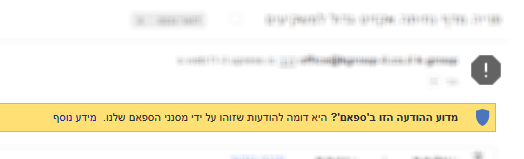 Original Hebrew WordPress interface. Follow the English instructions in this article; labels and positions may differ in newer versions.
8 Golden Rules for Email Content
If you used with the tools above and ruled out technical problems in sending the email, you can now assume that the problem lies in the content of our email.
To the question – How to improve the email content – a few rules , and here are the main ones:
1. Don't send an email that contains a single image
Sending an email that contains only a single image is one of the fairly sure ways to land in the spam folder.
It is worth taking the time to design an email with text and graphics that contains more than one image.
On the other hand, it is not necessarily better to send plain text messages (without images).
The rule is keep a balance between images and text.
2. Pay attention to the links in your email
Spam filters check the URLs you link to.
If you link to a domain with a bad reputation, the email will be blocked.
3. Don't use a short-link service like bit.ly
Your links must be full links to the real site address.
Link shortening services such as bit.ly are most often used by spammers.
4. Don't use structured technical data in the email
Spam filters check the content of the email from beginning to end:
Messages containing technical data ( such as IP addresses, user-agent type, the URL from which the form was submitted, the user's browser type )
will almost certainly cause spam filters to put the email in the spam folder.
Try to avoid sending technical data, unless it is an email for internal use that is not supposed to reach customers (in which case you will need to retrieve it from the spam folder and mark it as an approved sender).
For example, In the Elementor Pro plugin The default setting is to send the technical details,
You need to manually go to the form settings > Email section > Meta Data section > and manually remove the technical data.
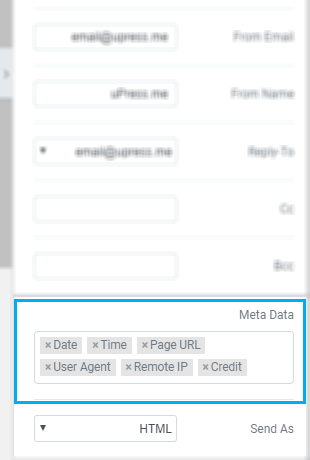
In the following example you can see how an email arrives with all the technical details (in the spam folder) an email with all the technical details (in the spam folder)
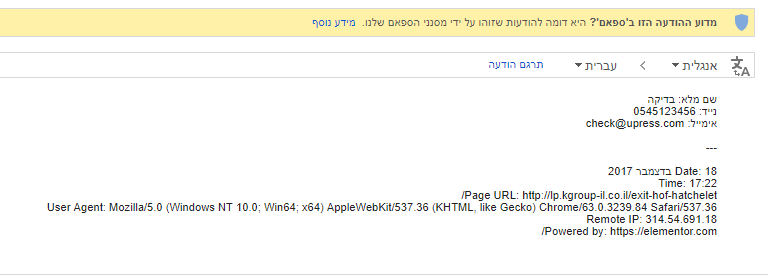 Original Hebrew WordPress interface. Follow the English instructions in this article; labels and positions may differ in newer versions.
5. Attach a plain-text version
Spam filters like messages that arrive with a combination of the version plain-text,
Serious WordPress plugins that provide full access to form management make sure to send the plain-text version in addition to the HTML version.
6. Avoid excessive use of special characters!!!!!
Another reason spam filters block email is the excessive use of characters:
Try to avoid overusing exclamation marks, periods, question marks and special characters in a way that might raise suspicion (!@#$%^&*)
7. Avoid using suspicious words
Using tempting words meant to lure potential customers into opening the email, such as:
Free, free of charge, You won, win, congratulations, etc. is an old trick that spam filters also know, and dislike.
Use alternative words that you believe the spam filters will not block.
8. Don't send messages that are too short or too long
Sending an email message containing too few characters is one of the ways to land in the spam folder.
On the other hand, emails containing thousands of characters are also a great way to get blocked by spam filters.
As with images and text – the rule is to keep the right balance.
A message with a number of characters that won't bore readers and, on the other hand, won't raise suspicion in the spam filters' checking engine.
Lessons and conclusions
In this article I tried to summarize an in-depth investigation of the subject that lasted two weeks. The main idea is that emails should be invested in to a reasonable degree but not really long-winded, and like everything in life a balance must be kept between text, images, punctuation marks and other mistakes that can cause the email you invested in to end up in the spam folder.
Following the rules above will ultimately help on the email conversion rate and it will serve the purpose of sending them.
Finally, spam filters are designed and programmed to think like humans, so whatever applies to them probably applies to humans as well – No one wants excess.
If you have suggestions for improvement, ideas, insights or comments, I would be glad to hear your responses to the article.
