As a company providing services in the field of website hosting (and especially WordPress sites) we come across many requests for WordPress sites that are experiencing Large user traffic for a focused period, for example during television campaigns, or high-volume campaigns running paid advertising on social networks and in the press, which attract a large number of visitors in order to sell some product or to run a fundraising campaign.
Adapting a customized server infrastructure for such a campaign can be A very expensive story If you are not familiar with all the technologies available to us. In this article I am going to present to you the variety of solutions that exist at uPress for large numbers of visitors (real-time peak).
I will carry out a performance review and load testing with about 1000 real concurrent users (at peak time), and I will show how such a load can affect the server and the site's loading time.
The article will deal, among other things, with performance efficiency using caching, so if you are not well versed in the subject, I would recommend reading first the article on What Is Caching and Why Is It So Important?

First, let's get to know the types of cache
As of today, uPress has five different cache levels globally (for all sites), but today we will focus on 2 main ones for this comparison. These are the ones used by most sites hosted on our platform, subject to their availability in your hosting package.
Application caching
Application cache, as its name implies, is the optimal cache state for most sites, where most of the caching work is performed by the "application" (WordPress, in our case a WordPress plugin).
This mode uses cache memory on the server by means of a WordPress plugin installed on the site. This is in order to save the latest CPU calculations that were performed (at the PHP level). The plugin essentially converts PHP pages into HTML pages that require no CPU calculations (after the CPU has already calculated them just once).
In addition, the mode adds expiration to the site's files (HTML, CSS, JS, etc.) at the browser level (HTTP Expires Headers, A parameter tested in a variety of speed-testing tools such as). This action is usually performed by the cache plugin ezCache.
Aggressive caching (NoSQL Mode)
Aggressive cache mode is a mode we developed at uPress to handle extremely heavy loads. The mode actually turns your site from dynamic (involving CPU calculations) into completely static (with no CPU calculations); in this mode no call is made to the site's database (DataBase) and no operations at all are performed at the PHP level.
In effect, a process identical to application cache takes place, in which PHP pages are converted to HTML pages, The only and most significant difference is that every visit to your site by visitors goes through this cache layer, without any direct request to the server itself.
In fact, the only entity that accesses your server is the cache layer, and all visitors access the cache layer.
In simple terms: the cache layer serves as an "intermediary" between the visitor and the server. The visitor accesses a link, for example upress.co.il/page1, and in fact reaches the cache layer. If the page exists in the cache layer, it is served directly to the visitor without a single CPU computation having been performed. If the page does not exist, the cache layer will go to the server and ask it to create the requested page, and when it receives the final result, the page is of course stored permanently in the cache layer and will be available for subsequent visitors.
This way, requests to the server and unnecessary load on the server are saved, and of course loading speed becomes extremely fast.
It is important to note that NoSQL Mode is intended for and recommended to sites that remain static with structured content, and is not recommended for sites that need to remain dynamic (portals, blogs, stores).
Although aggressive cache mode can be enabled on all types of sites with special adjustments (excluding certain links, excluding certain IP addresses).
Performance review – comparison between cache types
The performance review will be carried out on a VPS Advanced server with 4 CPU cores and 8GB of memory (relatively high server resources). This server also hosts a site with about 100,000 posts (a sizeable database that would not embarrass a rich news site).
For the test I will run 3 tests, and for each of them I will attach an image showing the site's load time (when there were about 1000 users on the site in real time), as well as another image showing the server data during the test.
Without an application-level caching plugin
I will begin and open the performance review with loading the site without an application-level caching plugin, but with the default server-level cache.
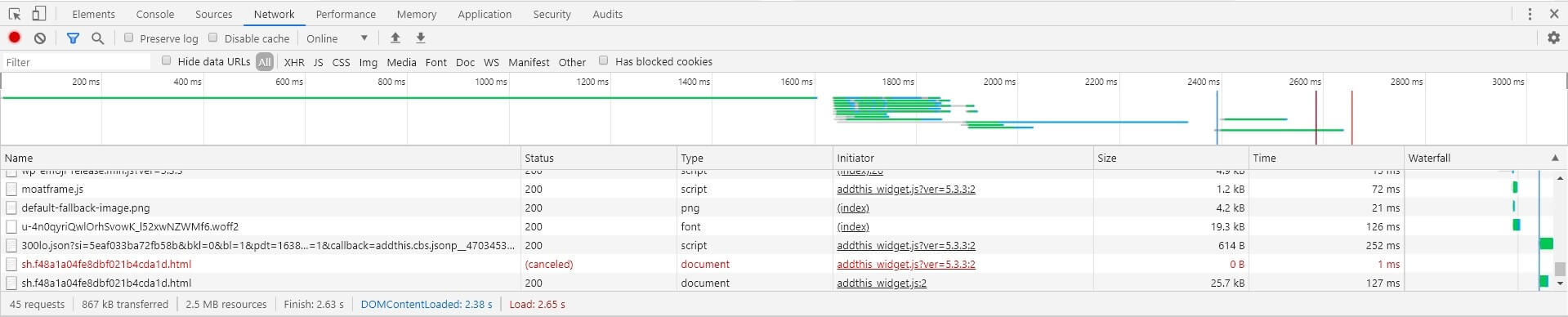
In the image you can see that the full loading time of the site (at peak time) was about 2.65 seconds.
Also, in the following image from the server statistics management panel you can see that the server's average load stood at 80.67 and utilization of 7 out of 8 CPU cores (about 90% of the server's CPU resources).
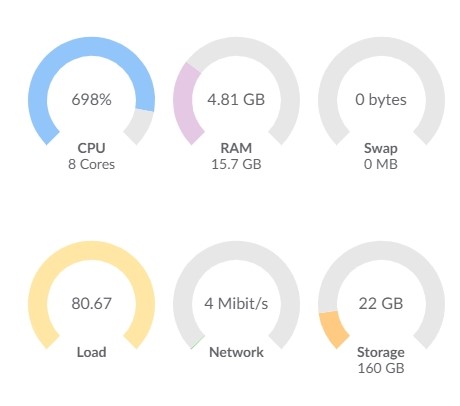
Needless to say, when a server reaches a high average load of 8+ on a VPS Advanced server, most visitors do not get the user experience you expect, and there may be disruptions in displaying the site's full content (through 5xx errors of all kinds).
Application caching mode
I will now move on to running the site in application-level caching mode
and I will run the overall performance review again with 1000 concurrent visitors on the site.
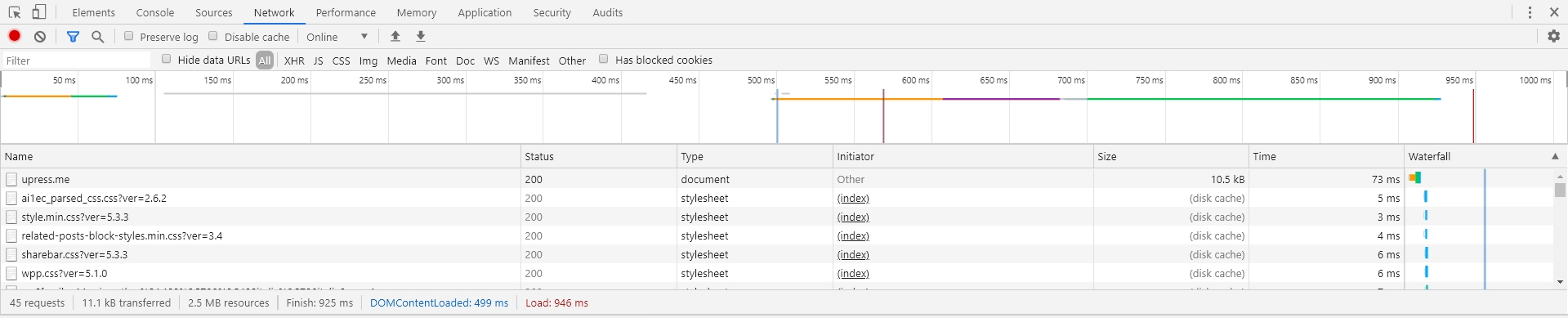
You can see that the site's loading time shortened significantly to 946 milliseconds from 2.65 seconds, which is 2650 milliseconds (a 280% improvement in the home page's loading speed thanks to enabling application-level caching mode (the ezCache plugin), together with a load of about 1000 simultaneous visitors)
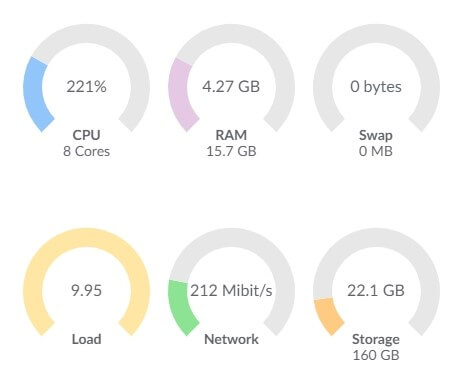
In terms of server resources, you can see a sharp drop of 800% in the average load and 300% in CPU consumption!
Aggressive caching (NoSQL Mode)
Of course, in this case too we ran the test with a load of about 1000 visitors on the site at the same time. Here are the results:

In the image above you can see a total loading time for the home page of about 699 milliseconds (a 380% improvement over loading with no cache, and about 35% over loading with application-level caching). But keep in mind that this is a very basic site that we set up for this comparison – and of course on a complex site with multiple plugins and PHP calculations we would see more significant differences.
In terms of server resource usage, you can see the following picture:
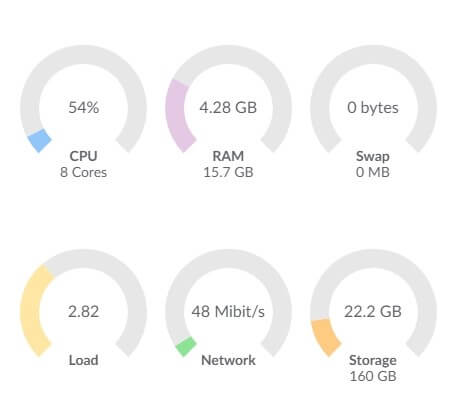
The most important point is the average server load; a site serving about 1000 concurrent visitors that manages to keep an average load of 2.82 – this is achievement great.
An improvement of a 1296% improvement in CPU usage and 2860% in average load, compared to server resource usage under a load of about 1000 simultaneous visitors with no cache at all.
and also, an improvement of 410% in CPU consumption and 353% in average load, compared with server resource usage under a load of about 1000 simultaneous visitors with application-level caching, and all this on a simple site for testing purposes only; as mentioned, on a site rich in plugins the differences will be much greater.
In summary
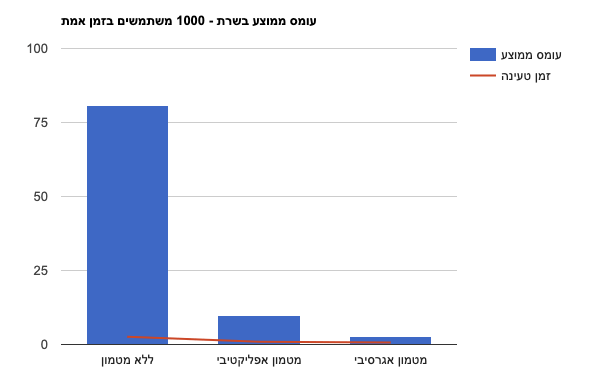
Below is a simple graph describing the load time and the average server load in the three caching modes:
 Historical measurement or comparison from the original article. Hebrew labels are retained in the original chart; refer to the English explanation in the surrounding text.
The variety of cache modes available on our system are modes that will help you significantly improve your site's loading times, especially if your site experiences high numbers of simultaneous visitors. It is important to remember that the experiment in the article was performed on a very simple site, nearly free of plugins and with a basic design theme.
There are several more solutions that we provide for dealing with a large mass of simultaneous visitors, and one of them is Dedicated plan for heavy loads of ours, which I did not review in the article but which is definitely a recommended solution for high concurrent visitor loads if you have a single site.
I hope I managed to put the subject of application caching in order for you and to present in a simple way the capability of caching when dealing with a large load of visitors. If you have any questions on the subject, you are welcome to comment on this article and we will be happy to answer.