
What does that mean?
Who are resellers? If we regard uPress as a contractor and the hosting packages as a project, resellers are essentially the subcontractors,
The employees on one side facing the contractor (uPress) and on the other side facing the end customers (the site owners).
A reseller can be, for example, a web-development company, an SEO company, or a customer who owns several sites that require ongoing operation.
Toward the end client (the site owner), the reseller acts as a hosting service provider, while with the hosting provider (uPress) the reseller manages a supplier-customer relationship.
How does it work?
The reseller purchases from a hosting provider (uPress) a hosting package of their choice from among the packages we offer on the site, which they configure, divide and share with their customers, according to their needs and at their discretion.
Customers of the package owner can either be managed by the package owner or manage their own package themselves, but the owner is the one who holds the reins and is the only one who deals directly with the hosting company uPress.
What is the difference between managed server hosting plans and reseller hosting?
In fact, all of our hosting packages allow working as a reseller because we provide the "hosting package sharing" service,
The main difference is that in this working method, the owner of the main package is the only party who can receive support directly from the uPress hosting company,
Another difference is the price calculation relative to a single site – it comes out much cheaper than a situation in which the end customer buys a personal hosting package directly for their own site.
Sharing hosting packages – how do you get started?
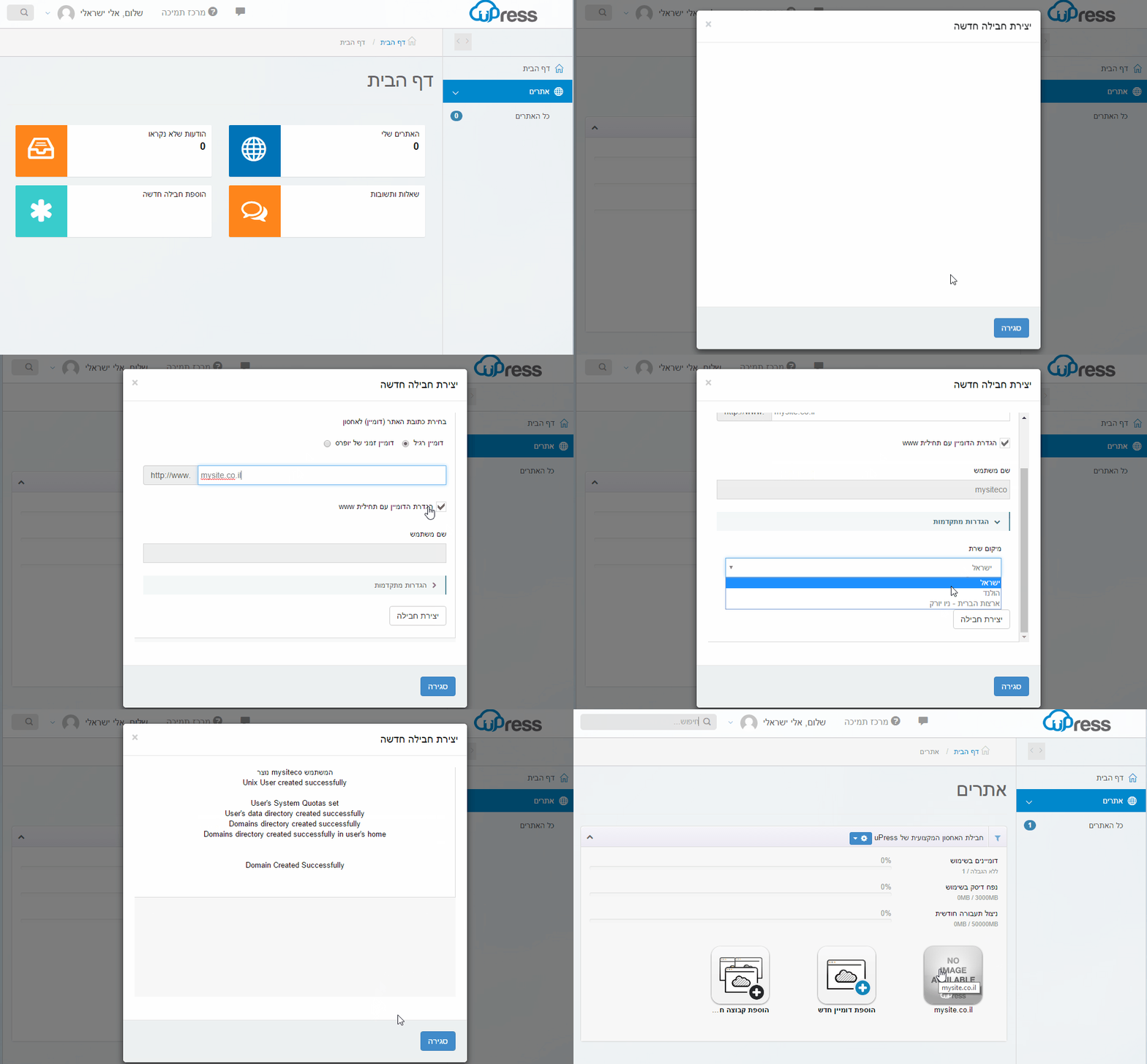
After entering the login details, we go to the uPress management panel and start by creating a new site.
 Original Hebrew uPress control panel. Follow the English instructions in this article; labels and positions may differ in the current interface.
On the home screen, go to the screen All Sites > click the button Create a new domain > we will enter in the required field our domain address (the address that should be displayed at the end of the process) > and click the button Creating a plan.
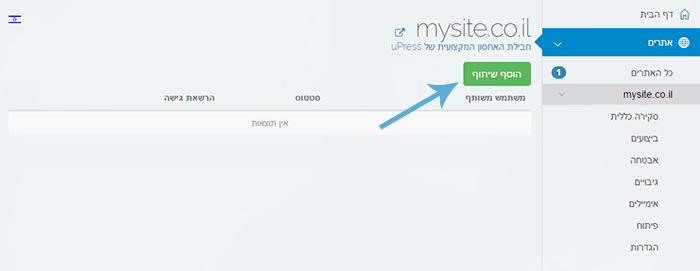
Next, we will want to access the management of the new WordPress (Mysite.co.il) that we created, so that we can to share it to the end client (the site owner).
We will do this by clicking on Settings tab > select the option of Sharing Management > and clicking the button Add New.
 Original Hebrew uPress control panel. Follow the English instructions in this article; labels and positions may differ in the current interface.
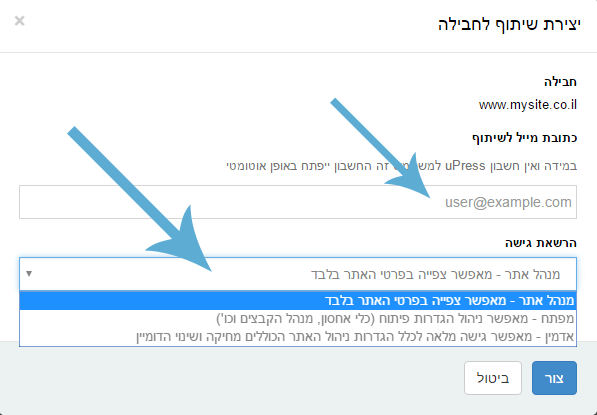
Now, we will need to enter an email address email to which the invitation to share the package will be sent (this email address will be used as the username in order to log in to the system),
and in the second step we will choose the permission level we want to share, from 3 options to choose from.
 Original Hebrew uPress control panel. Follow the English instructions in this article; labels and positions may differ in the current interface.
3 types of permissions:
- Site manager permission – allows permission to view site data only.
- Developer permission – allows managing development settings (hosting tools, file manager, etc.)
- Admin permission – allows full permission for all site management settings, including deleting and changing the domain (except for financial matters)
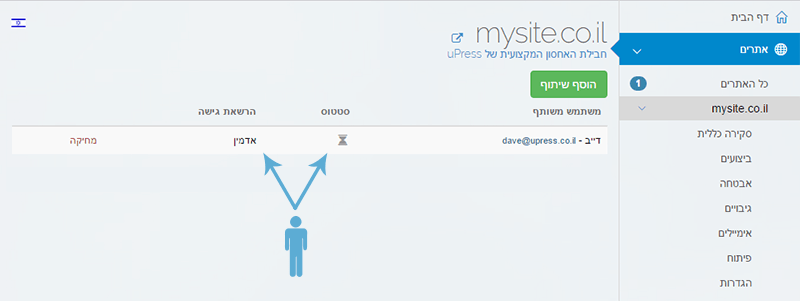
Clicking the button Create will send an invitation to share the package to the specified email address, and now all that remains is to track the package shares.
*In addition, all your customers will be able to share with you access to the hosting plans they previously purchased on their own, and you will be able to manage them under your own private account.
 Original Hebrew uPress control panel. Follow the English instructions in this article; labels and positions may differ in the current interface.
And on the other side of the scale
And meanwhile, on the other side of the scale, the end customer receives an email that includes a detailed invitation to use uPress services and to get admin access to the requested site.
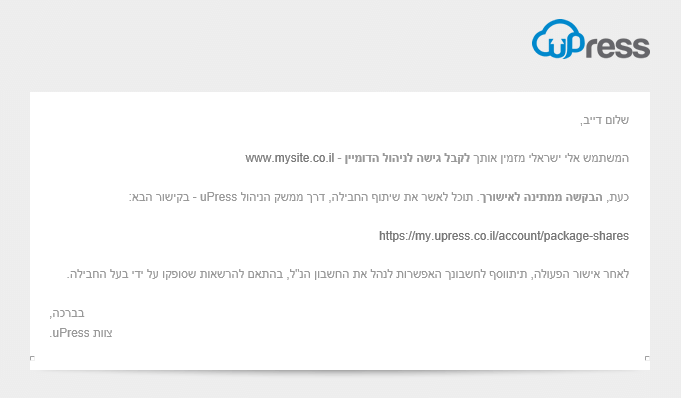 Original Hebrew uPress control panel. Follow the English instructions in this article; labels and positions may differ in the current interface.
As the end customer (the site owner): on the home screen, go to our personal icon at the top left of the screen > click the Shared Packages button. Now a list will be displayed of the packages that were shared to my account and are awaiting approval. to the personal icon on the top left of our screen > click the button Shared packages.
Now, we will be shown a list of plans that were shared with my account and are awaiting approval.
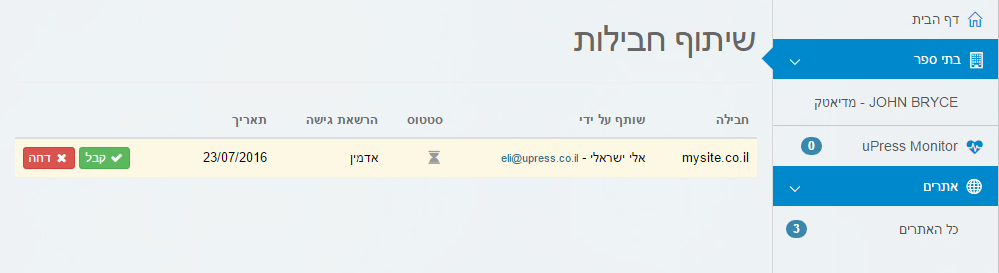 Original Hebrew uPress control panel. Follow the English instructions in this article; labels and positions may differ in the current interface.
Now, all that remains is to approve receiving management of the shared plans. We do this by clicking the button Accept.
Afterwards we can see all of our shared packages under the All Sites screen, and manage the sites according to the access permission that was granted to me by the package owner.
In summary
As noted at the beginning of the article, the reseller purchases from a hosting provider (uPress) a hosting package of their choice from among the packages we offer on the site, which they configure, divide and share with their customers according to their needs and at their discretion.
Customers of the package owner can either be managed by the package owner or manage their own package themselves, but the owner is the one who holds the reins and is the only one who deals directly with the hosting company uPress.
In addition, all billing and payment matters toward the customers will be managed independently by the owner of the company at uPress (the reseller) toward the customers.
