
Welcome to the section Plugins, in this section we will review several very popular WordPress plugins in different usage categories.
This week, we will review 3 WordPress plugins that will improve the efficiency of your WordPress site.
 WordPress plugins: a collection of tools that add features to a WordPress website. Original Hebrew article artwork.
You created a new WordPress site or blog for yourself, and after not much time you managed to understand what is going on behind the scenes, Maintaining a WordPress site is not a simple job.
After all, you created a site so that you would have a place to present some topic and write articles related to a subject you love and become part of some community,
but Of course, you didn't plan on wasting hours filtering spam comments and checking broken links on your site.
Luckily, there are several excellent WordPress plugins that will handle the grunt work that comes with maintaining a WordPress site; in the following article we will present 3 key plugins.
Broken Link Checker
There are two very important parties who don't like running into broken links on your site,
the site's visitors your site, and – Google, visitors who are looking for some information on your site and move between pages by clicking links are visitors you must not disappoint,
If visitors encountered a page "404 Not Found" they become very disappointed and there is a high chance that they will abandon your WordPress site.
Google gets terribly angry when it encounters broken links on your site. A site with a large number of broken links is automatically interpreted as a site with a poor user experience, and in such a case its search engine ranking score will respond accordingly.

Broken links are a phenomenon that happens much more than you can imagine. Sites you link to may be blocked / unmaintained / abandoned, a certain page may have been removed, or the page's address (URL) may have been updated.
Before you decided to use this plugin, you would have relied on the opinions of visitors when they encountered a broken link,
The plugin performs a proactive scan of all the links in the pages, posts and comments on your site. If it comes across a broken link on your site, the plugin will send you an email alert and will even prevent search engines from crawling the page that contains the broken link.
Akismet
Akismet is another plugin that is defined as a "Required plugin" on every WordPress site.
In fact, it is the plugin with the highest number of downloads in the WordPress plugin directory, with over 24 million downloads.
There is a phenomenon of WordPress sites being targeted by spammers and people who want to promote their own sites by planting inbound links. In fact, high-traffic sites receive more spam comments than legitimate comments. There are WordPress sites that receive over a million spam comments every month!
In fact, high-traffic sites receive more spam comments than legitimate comments.
There are WordPress sites that receive over a million spam comments every month!
It is fairly simple to remove or report spam when it comes to a single comment, but imagine receiving a million spam comments every month!
dealing with a huge amount of wasted time that could have been used to create new posts for your WordPress site.
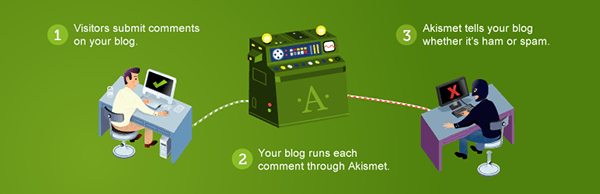
The Akismet plugin automatically checks every comment on your site, filtering out comments that look like spam or comments with offensive content.
The plugin is not perfect and you will still have to delete several spam comments that managed to slip past the automatic system, but it will save you a lot of time.
PhotoDropper
If you are a content writer or on your way to becoming one, you have surely run into the difficulty of choosing an image for a post.
You can create a great post without investing much time, and even optimize it for SEO. The step that usually takes the most time is choosing a relevant image to the post.
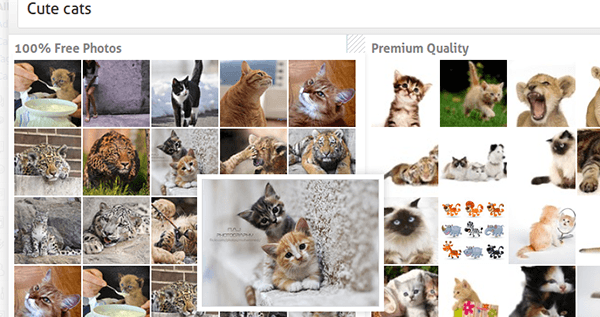
You should get to know the PhotoDropper plugin. The plugin lets you search for free, high-quality images by keywords, all within your WordPress interface.
The plugin searches a database containing over 243 million free images under a Creative Commons license, and over 10 million premium-quality images.
After searching for a particular image by keywords, all you have to do is click the image and then "insert into post".
