Most people who work with websites, and with cloud infrastructure or internal organizational networks in general, have come across the term DNS,
From my extensive experience providing technical support, I have come across quite a few knowledge gaps among people whose lives mostly revolve around building and maintaining websites / web applications. This raised in me the need to take up the gauntlet and write a detailed and comprehensive article on DNS.

So before we begin… a bit of history
Many years ago, in 1969, when the Internet was founded (then it was called ARPANET) there were about 4 servers across the USA that handled the entire "internet" that existed at that time; there were no complex infrastructures and systems that synchronized with one another in order to update data about sites on the internet.
there was a single server on which a hosts file was stored; in this file, the addresses of websites (domains) and the IP addresses of the servers they ran from were defined.
Once the internet grew and became more serious, the above solution turned out to be less and less effective and the method had to be reinvented.
In 1983, Paul Mockapetris (from the University of California, USA) decided to take up the gauntlet and reinvent the entire system that determines which server a given domain is served from. That is how the DNS system we use today came into being.
So what is DNS? And why do we need it?
DNS stands for Domain Name System, and it is actually a communication protocol used to access a distributed database of the IP addresses that sit behind a particular domain name (and not only IP addresses – there are a few other things, we will get to that later in the article).
In fact, every address that we access in the browser gets "translated" to some numeric address (the IP address of the server on which the site we're browsing is located).
If we take a more concrete example, remember when we used to use a phone book to find the number of a particular person by their name? It's the same thing here.
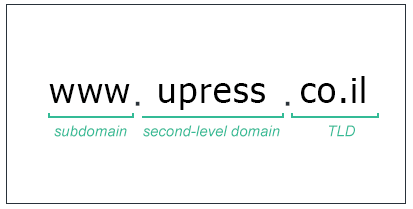
The moment we type the address www.upress.co.il in our browser's address bar, the browser performs a "translation" to the IP address of the server on which the site is hosted, and displays the site to us through the server it found "behind the scenes".
Behind the domain address hide three parts separated by dots
Before I begin, a few words about the rules and laws of DNS around the world:
IANA – stands for Internet Assigned Numbers Authority
is an authority subordinate to the US Department of Commerce and under the US government that works under ICANN, and it is the sole authority for determining TLDs in the world, for determining internationally accepted communication protocols, and for certain ports for specific services that were predetermined as intended for those services.
ICANN – short for Internet Corporation for Assigned Names and Numbers
is the authority responsible for allocating domain names for each country, and responsible for the "world order" in the management of the global DNS. It is also responsible for overseeing the maintenance of the global Root DNS servers.
Until 2016 the authority was itself responsible for maintaining the Root DNS servers, until the matter was handed over to Verisign, and it is now under ICANN's supervision alone.
I will explain each part of the domain (from left to right):
Subdomain
is the part that contains the beginning of the domain (www, or subdomains (Sub-Domains), or services managed by the domain through other hostnames (such as pop, smtp, mail, etc.)) and that point to other servers or to the server where the main domain is managed.
SLD – short for Second Level Domain
This is actually the part you chose to name your brand/site/business. It will be managed under the NS servers of the domain registrar from which you purchased the domain (by default, after purchasing a domain, the NS server addresses of the registrar from which you bought the domain are set automatically, since logically and hierarchically a domain cannot be left without NS servers to manage it), and afterwards you can change the NS servers through which the domain's DNS records are managed as you wish.
(Our customers, we instruct to set our NS servers ns1.upress.io and ns2.upress.io after they register a new domain, or alternatively want to transfer a domain managed by another hosting company or another domain registrar to our management/to our hosting server)
TLD – an acronym for Top Level Domain
This is actually the extension of your domain; it can be .co.il, .org, .net, .io and many other varied extensions, which are divided into countries, organizations, business activities, etc.
As of the post's publication date there are 1517 different and varied TLD extensions. If you are curious to know which extensions are defined as TLDs, you can visit the website of IANA.
So after I have presented, in theory, what happens when we type an address in the browser, and explained the parts of the domain, it is time to move on to more practice: so what exactly happens behind the scenes the moment I type a particular domain into my web browser?
So how does it work?
As soon as we type a certain site address into our browser, a request is made from our web browser to the DNS service on our computer itself (the service is installed on our operating system and works together with our network card).
From there the request goes to our internet provider's DNS server (shown in the attached image as Recursive Resolver). This is a server in which the communications provider keeps a very large cache containing DNS records of sites that were requested by the provider's users, and if the provider lacks information about the site address you are trying to access, it queries the DNS servers around the world, receives the information from them and saves it in the cache according to the TTL defined in the records).
After we type a URL in the browser – what is the process that actually takes place?
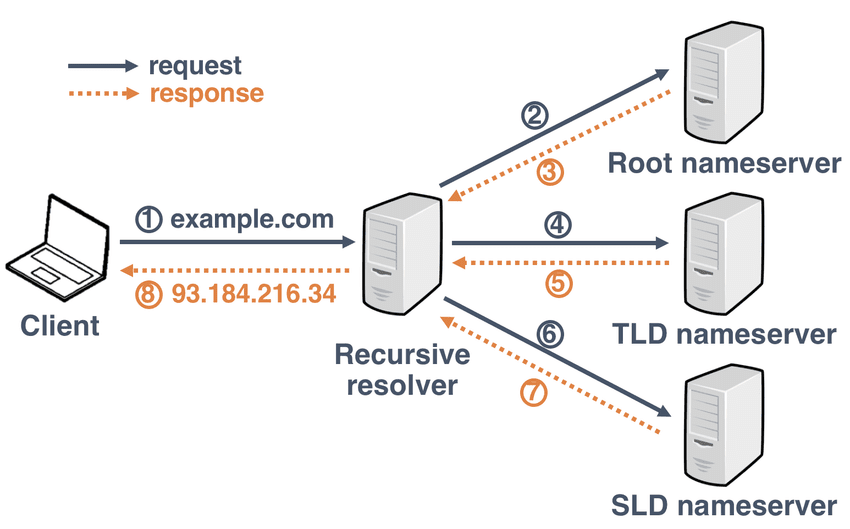
Before we dive into the technical process that takes place, I would like to explain an essential concept that will accompany us going forward.
NS – short for Nameserver
is a server that aggregates tens to hundreds of thousands of DNS records of domains that refer to it for a certain part of them (in the TLD or SLD and Hostname, I will elaborate below) within Zone Files. Every NS server in the world has tens to hundreds of thousands of Zone Files, and in the world as a whole I estimate that there are hundreds of millions of Zone Files.
The Zone Files on each of the NS servers present guidance on "where" the DNS service on our computer should look for the domain (on which server) until reaching the server that hosts the site's content (by means of the A record's guidance, which I will elaborate on later).
Back to the technical process: as I mentioned at the beginning of the article, at the beginning of the Internet era there was no DNS and all the "DNS" records were located in one file on a particular server. Since the DNS era there are global Root Nameservers between the letters A-M and their addresses are:
A-M.root-servers.netHaving multiple Root Nameservers helps us maintain DNS resilience worldwide and 100% uptime on the global internet.
From the above figure one might understand that there are 13 global Root Nameservers; this is not really the case, because the servers work with the Anycast protocol, which means that one IP address serves several servers; in this case, under each IP address there are around 90 servers, give or take, that it serves.
As of the post's publication date there are 1034 Root Nameserver servers in the world, spread all over the world (including in Israel) and maintained by 12 different organizations.
You can view the full map , the role of the Root Nameserver servers is to route the request of the browser or visitor to the TLD Nameserver server (according to the domain's extension).
In the following example we will present the process that takes place the moment we type the address of a particular site, "behind the scenes" on the DNS servers
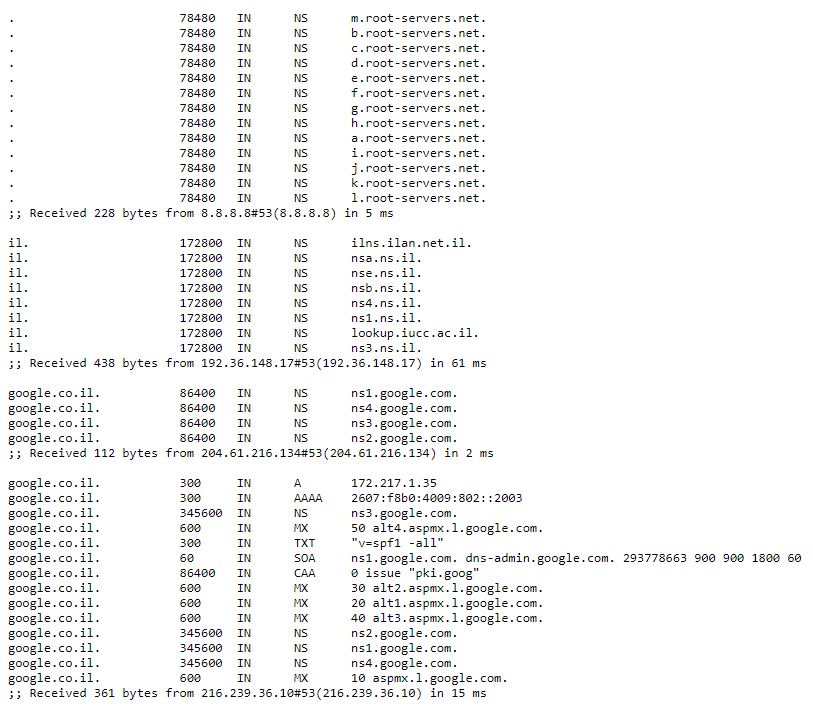
The tool by which I performed the check is called the dig +trace command on the Linux operating system; there are also web tools by which you can perform this check.
We will go over the records from top to bottom;
First You can see that the DNS service first of all turns to the Root Nameservers, of course, using a Trailing dot – this is the dot that comes after the domain,
in order to tell the DNS server for which domain we want to run our query, so when writing domain records we use @, which means our domain name managed by the DNS server, or alternatively the domain name with a . at the end.
Then The Root Nameservers "direct" the DNS service in the operating system to the il extension of the domain, and it reaches the DNS servers that manage all the domain names containing the il extension,
and finally After they find the domain name google.co.il within them, they "direct" the DNS service to the NS servers that contain the domain name.
Within Google's NS servers is the zone file of the domain google.co.il, and it contains all the popular records that I will detail here:
TTL – an acronym for Time To Live
This is the time set for the DNS service that receives the records to keep the records with it (after that they "expire" and a new query must be made against the NS server that holds the records file). This time is measured in seconds. 300 seconds is 5 minutes. And how much is 345600? Divide by 60 and you get the number of minutes, divide that by 60 as well and you get the number of hours, divide the remaining number by the number of hours in a day (24) and we get that 345600 seconds is actually 4 days (which are 96 hours, which are 5760 minutes, which are 345600 seconds).
A Record
This is the record that points to the IP address (IPv4 – the "traditional" IP address we are all familiar with) where the site/web application we are accessing is actually hosted.
This address can also point to a CDN (Content Delivery Network) through which the site's static content passes (images, HTML pages, JavaScript files and all the non-dynamic files, not anything related to the server side).
AAAA Record
This is the record that points to the "new" IP address of the Internet world (an IPv6 address), the IP address that has already come into use at the service giants and leading online technology companies, after the "traditional" IP addresses ran out in the world. This address is not really new and was invented whenever IPv4 was invented, but until the last 5 years it was not put into use because the regular IP addresses were in use. The number of combinations of an IPv6 address is a huge number of combinations, compared to regular IP addresses, which contain about 4,000,000,000 that have all run out, as I said, and therefore in the coming period we will see more and more uses of IPv6 addresses.
NS Record
NS records are the records in which the Zone files (the files that contain all the records for a particular domain) are actually managed
MX Record
This is the record of the mail servers that handle the emails (incoming and outgoing) of a particular domain. Some mail services are provided by "small" providers (such as website hosting providers, for example) and some mail services are provided by technology and cloud giants (Amazon Web Services – SES, Office 365, Google Gsuite). A Priority can be defined for each MX record: the lower the Priority number, the earlier the mail server is addressed. In the image above you can see that there are 5 MX records whose Priority is set in the range of 10-50. The first server to handle incoming and outgoing emails is the server with Priority 10; if it is unavailable, mail handling will move to the next mail server by the priority defined, and so on.
TXT Record
This is a TXT record. In this record we use it to verify our ownership of a certain domain by pasting a verification code that we receive from some service, and we also use DKIM and SPF records to send verified emails in the name of the domain we use to send emails.
SOA Record – an abbreviation of Start Of Authority
This record is a summary of information about the address of the primary NS server that manages the domain (as I mentioned, there are two DNS servers in order to provide redundancy, one of which is the primary and the other the secondary; the servers are configured in a Master-Slave setup, and the ns2 server replicates the DNS records from the ns1 server according to the serial number given in the SOA record for a particular domain at any given moment).
Synchronization between the primary and secondary NS servers is performed according to the DNS configuration defined by the server administrator when it was set up. It is possible to synchronize the entire records file; this synchronization is called AXFR, and it takes place the moment the secondary NS server receives an update that the records file on the primary NS server has changed.
In contrast, there is incremental synchronization, known in professional jargon as IXFR. This synchronization is done through a "log" of the DNS servers: the moment the secondary NS server receives information that some record in some domain has changed, it immediately updates that specific record from the primary NS server – and not the entire file.
In summary
I hope I managed to summarize the DNS topic well, and that you now understand a bit more about the concepts and actions that happen behind the scenes.
Thank you for reading. If you have questions or comments about this article, I would be glad if you shared them with us and I will respond accordingly.