
SEO – The Ultimate Guide for WordPress Sites
WordPress is one of the best content management systems, if not the best of them, when it comes to search engine optimization (SEO).
In fact, if you thought that investing time in SEO on your WordPress site was a waste of time, that is a grave mistake. Properly optimizing your site according to the best practices described in this article will help you improve your ranking, gain more subscribers / customers and improve your WordPress site in general.
In fact, the subject of SEO in WordPress is very broad, and it takes a lot of concentration and patience to learn it. This article covers quite a lot of topics and is therefore very long; you can check the table of contents and jump to specific points in the article.
First of all, you should know that there are various plugins for SEO in WordPress, and most of them will do the job well, but in this article we will work with the plugin Yoast SEO, it is a plugin with very special functions and great power for SEO.
As with search, SEO and the WordPress platform, technology changes all the time, and we constantly try to keep this article up to date with current technology.
Table of Contents
1 :: The basics of SEO in WordPress
- 1.1 :: Links
- 1.1.1 :: Permalink structure
- 1.1.2 :: With or without WWW
- 1.1.3 :: Transition words
- 1.1.4 :: With or without SSL
- 1.2 :: Optimizing headings
- 1.2.1 :: Controlling titles with a plugin
- 1.2.2 :: Adapting the title to a specific page
- 1.3 :: Adjusting the META DESCRIPTION
- 1.4 :: Image optimization
- 1.5 :: XML mapping
2 :: Adapting themes
- 2.1 :: Breadcrumbs
- 2.2 :: Paragraph headings
- 2.3 :: Clean up your code
- 2.4 :: Improve loading speed
- 2.5 :: Rethink affiliate links
- 2.6 :: HTML sitemap
3 :: Advanced SEO and duplicate content
- 3.1 :: Enabling "noindex", crawling archive pages and manual removal
- 3.2 :: Disabling unused archives
- 3.3 :: Numbering and pagination
- 3.4 :: Canonical links
4 :: Site structure for a high ranking
- 4.1 :: Pages instead of posts
- 4.2 :: New wine in an old bottle
- 4.3 :: Links to related posts
- 4.4 :: Be careful with tags
5 :: Mailing list optimization 6 :: Comments optimization
- 6 :: Keep your readers engaged
- 6.1 :: How to get users to comment
- 6.2 :: Empower your commenters
- 6.3 :: Keeping users in the discussion
7 :: The hardest part
- 7.1 :: Keep track of your comments
- 7.2 :: Tweet on Twitter
8 :: Measurement results 9 :: Conclusions about SEO in WordPress
1 :: The basis for SEO in WordPress
Out of the box, WordPress is a content management system that is neatly tailored, and does the job much better than any other content management system,
But there are still a few things that need to be done to make it much easier to work with.
1.1 :: Links
1.1.1 :: Permalink structure
The first thing to change is your permalink structure.
The permalink settings can be found under: Settings → Permalink Structure, the default permalink structure is /%category%/%postname%/,
but we prefer to use /post-name/ or /category/post-name/. For the first option, just choose the option Custom structure and enter in the text box /%postname%/.
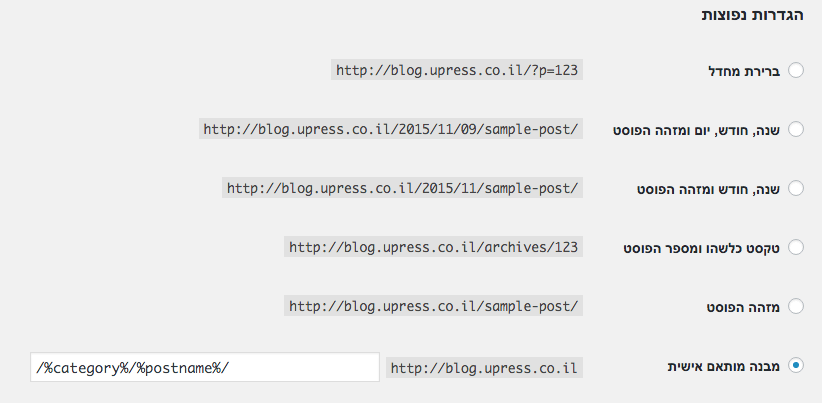 Original Hebrew uPress control panel. Follow the English instructions in this article; labels and positions may differ in the current interface.
To also include the category in the permalink structure, enter in the text box /%category%/%postname%/, If it was previously defined for you p=posd-id? – don't worry,
WordPress will handle all the redirects for you automatically; this is true even if you are changing from /%postname%/ to /%category%/%postname%/.
If you choose to change from any other permalink structure, you may want to read an article focused on the subject – Changing the permalink structure.
1.1.2 :: With or without WWW
You need to decide whether you want your site to appear as www.example.com or example.com .
Choose Settings ← General, and type in the text box under WordPress Address (URL) – the address you chose.
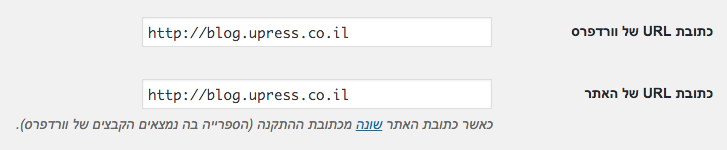 Original Hebrew WordPress interface. Follow the English instructions in this article; labels and positions may differ in newer versions.
You can read a more in-depth article on this topic – With or Without WWW – Which Site Address Is Better for SEO in WordPress?
1.1.3 :: Transition words
The last thing you want to do to improve your site's ranking is to remove the stop words from the post name,
words like of.. the.. and.. The most.. If you work in English – the Yoast plugin automatically hides stop words from the URL, but they will still appear and affect searches.
If the links to your posts are already published across the web or people visit those links – try not to change the links, even though WordPress should take care of most redirects to the new links automatically.
1.1.4 :: With or without SSL
In 2014 Google announced that it gives a (small) ranking boost to sites that use SSL / HTTPS,
And for this reason – more and more web developers have moved to using SSL. It could be an excellent idea for you too; if you want to move to using SSL, look for an in-depth article on the subject.
1.2 :: Optimizing headings
the title; this is an HTML tag that looks like this –
, the title is one of the most important factors for improving search-result rankings. The title is the text that appears at the top of the browser tab, and it is the first line people see in search results, followed by the site address and then the relevant snippet; in addition, a date passed to the browser via the meta description is displayed.
The title is the text that appears at the top of the browser tab, and it is the first line people see in search results, followed by the site URL and then the relevant snippet; in addition, a date passed to the browser by the meta description is displayed.
 Original Hebrew WordPress interface. Follow the English instructions in this article; labels and positions may differ in newer versions.
On many sites, the post title is a concatenation of the pages, such as "Site name » Archive » Post name" or "Site name » Post name",
In order for your site to get the traffic it deserves – it's worth doing it the other way around: the post name is the most important! Search engines are robots that put more weight on the first words of the title,
and therefore if the post name is placed at the beginning of the title, your ranking will improve significantly. Besides search engines, humans work the same way as search engines,
They scan the site's results by looking at the first words of the sentence first; if the word they searched for is placed at the beginning of the sentence – they will likely click.
For the sake of the example, the optimal title for this page should be: "WordPress SEO » Blog » uPress".
1.2.1 :: Controlling titles with a plugin
You can control your page titles through the Yoast plugin that we work with in this guide; there are two parts of the plugin that control this area.
First of all, once you install and activate the plugin, an SEO tab is added under Settings; go to the page Settings ← Titles & Meta, and you will see several types of tabs for different types of pages on your site.
For each post type and taxonomy you can set title template (as well as meta description templates but we will get to those later). To control the titles of the posts on our site, choose the tab – Post types:
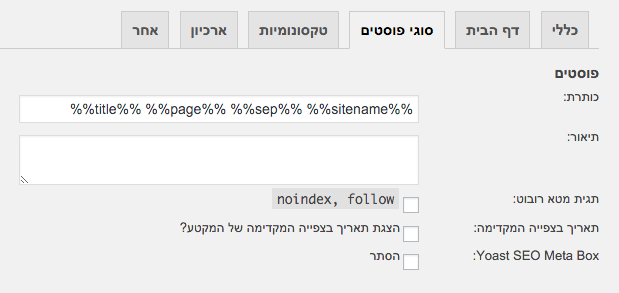 Original Hebrew WordPress interface. Follow the English instructions in this article; labels and positions may differ in newer versions.
There are several variables you can control that are sorted by page type. It is important to check that your page titles are not duplicated or repeated; if they are, you should check the Force rewrite titles in the tab General, or go to the page itself and edit the title in the plugin's tab (below the page content).
- Categories, tags, content types, and galleries will look like this –Archive %%term_title%% %%page%% %%sep%% %%sitename%%
- Search pages will look like this – Search for %%searchphrase%% %%page%% %%sep%% %%sitename%%
- 404 pages will look like this – Page not found %%sep%% %%sitename%%
- Archive pages will look like this – Archive pages will look like this – %%name%% wrote on %%sitename%% %%page%%
Where:
- %%term_title%% – taxonomy name
- %%sep%% – A configurable separator (the default is "–")
- %%page%% – The post / page name
- %%sitename%% – the site name
- %%searchphrase%% – the search terms
There are a few more nice features, for example you can use %%cf_%% to use a custom field or post custom field, for example the meta description or user meta value.
To change the The separator – %%sep%%, select the tab General, and choose one of the symbols from the following list:
 Original Hebrew WordPress interface. Follow the English instructions in this article; labels and positions may differ in newer versions.
1.2.2 :: Adjusting the title for a specific page
OK, now that we have learned to use title templates, we can start editing the titles of individual posts/pages.
For this purpose the plugin has a tab that includes a preview of how we appear in Google search results. The tab is located below the page content editor, and the tab's title is Yoast SEO:
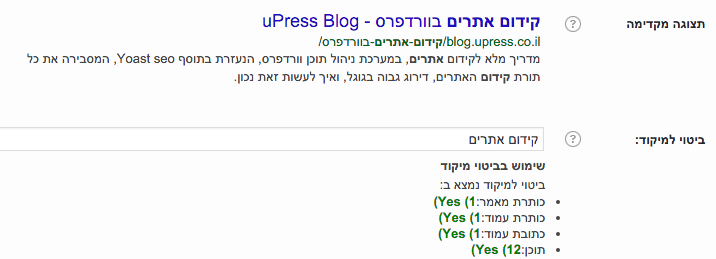 Original Hebrew WordPress interface. Follow the English instructions in this article; labels and positions may differ in newer versions.
The preview collects data from the post automatically, but if you want to edit the title into something more attractive and click-inviting, you can always edit the title.

The text field will display a warning beneath it if the title becomes too long; the title length is limited to the length of the display in search results. Important rules for editing a custom title:
- The title must always include the site name / company name, preferably at the end – so that people can identify you when skimming search results
- they must always prepare the keywords you think are most important for the current page, the same words that we will link toFocus keyphrase, these words must be at the beginning of the title.
- The rest of the title should entice people to click.
1.3 :: Adjusting the meta description
Now that we know how to adapt a title to a page properly, we need to start focusing onmeta description. Search engines usemeta description In order to display the description of the search results,
This is a short piece of text that gives a bit of an introduction to the specific page in search, meta description It is usually used when the description contains one of the search words the user searched for.
Some plugins in WordPress include the function of Automatic description – automated description, the plugin uses the first sentence of the post and automatically inserts it into the page's meta description of the page by default; this is not the smartest behavior you can expect, because the first sentence of the post usually contains nothing that sums up the whole page.
Therefore, the best way to do this is manually, and if you nevertheless trust the plugins with the automatic description – so just enable them and let them do the work,
automatic description It is a shortcut, and there are no real shortcuts in WordPress SEO. If you are not using meta description Search engines will look for the search term across the entire page, find a paragraph that seems relevant to them, and display it as the summary that appears under the title.
To manually edit the meta description Go to the plugin tab as we did in the previous section (Adjusting Titles) and below the title editor you will find a tab meta description,
Try to create a description for the page that will entice visitors to click, by using at least once one ofyour keywords .
We would remind you that the tab Focus keyphrase it is useless, and no search engine uses the words you write in it, which is why we did not mention it in the article.
1.4 :: Image optimization
Many developers do not attach importance to this subject, but it is a very important topic for SEO. You can improve your ranking by filling in the correct information in the alt of your images, and by giving your files proper names.
alt This is a tag attached to an image – this tag contains text detailing information about the image.
Search engines use thealt of the image and its name to search for images, so you can slightly improve traffic to your site,
Beyond that, you are helping your readers who use accessibility tools (screen readers) by reading the text in case the image is not displayed.
Using the tagalt It is also something that is checked in a functional analysis of the page, and it generally affects the site's ranking in search engines.
1.5 :: XML mapping
Site mapping is a very good option – when you publish a page or post, your sitemap is sent to the search engines and informs them that there is a new post, who its parents are and who its children are, and so it is another tool that helps you climb in the rankings.
Don't worry, this function does not make the site any slower. In the past, every time you published a page or post, the full sitemap was sent to the search engines; today only the specific page or post you created is sent, which is much faster.
This option is very good because it includes the images on the page and any other media you added to the page, and thus improves the ranking.
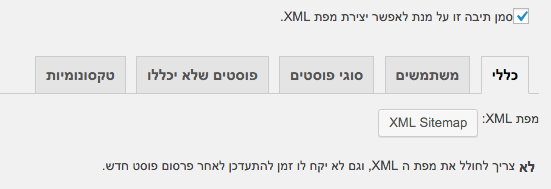
To enable this option – select SEO » XML sitemap and click the V to enable automatic mapping,
When you enable this option, a number of options for changing will appear. In most cases there is no need to change anything there, unless you have specific preferences.
 Original Hebrew WordPress interface. Follow the English instructions in this article; labels and positions may differ in newer versions.
2 :: Adapting themes
2.1 :: Breadcrumbs
You want to add to your site Hierarchy display, or as they are called – Breadcrumbs , breadcrumbs are links usually located above the page title, which show the user the hierarchy of pages from the beginning to the current page.
For example: Home » Articles » Some Article , breadcrumbs are good for two main uses: they allow your users to navigate your site easily, and if the user is currently reading an article about SEO, for example, where its category is "WordPress SEO", it can entice the user to click on the category and continue reading articles, and perhaps even later bookmark the site.
And the second use – they allow search engines to determine your site's structure more easily. Breadcrumbs are what should take you back to the home page and to the post's category, and they play a very important role.
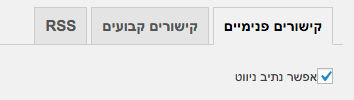
To enable breadcrumbs, go to SEO » Advanced, and in the tab of Internal links Tick the checkmark on Enable breadcrumbs, as soon as you enable The breadcrumb path Several options to choose from will appear; usually you will not need to change them.
 Original Hebrew WordPress interface. Follow the English instructions in this article; labels and positions may differ in newer versions.
2.2 :: Paragraph headings
Although most WordPress themes do this automatically – it is important to make sure that the title of your page / post is
Page / Post Heading
and nothing else,
The name of the site / blog should only be as a tag
on your home page.
In pages, posts and categories it should be no more than a
and the sidebar should not be cluttered with tags of
.
You can edit the paragraph headings by editing the post.php and page.php files located in the themes folder. To learn more in depth how to edit these pages, you can read a relevant article online.
2.3 :: Clean up your code
If your theme files contain lines of code containing JavaScript and CSS, it is time to move them to external files; inline lines of code do not do your site's SEO any good.
The advantage of external files is that search engines do not need to load them, which improves loading speed, and so they guarantee your users faster loading on all pages of the site, because the JavaScript and CSS are cached the first time the site loads, and there is no need to load them again each time.
2.4 :: Improve loading speed
One of the most important aspects of How many pages of your blog the search engine will map each day, are – how fast your pages load, and you can take 3 main actions to improve loading speed:
- adapt your theme to access thedatabase tables (mysql), you can read about this in more depth in the next article.
- Installing a caching plugin, we recommend WP Super Cache – a plugin that is very simple to use.
- Installing a CDN plugin, a combination of Caching plugin and CDN plugin will greatly improve your site's performance. For more on CDN plugin You can read on the next article.
Also, it is very important to be aware that hosting your site with a company that sells free / cheap hosting is not smart on your part.
If you truly want to succeed in building your link profile and want your blog to be able to withstand heavy loads, then go for the best and don't compromise.
We recommend our hosting packages at uPress, which are absolutely suited to WordPress sites/blogs and proven to be the best in the field in Israel. If you want to know more about the subject, you can visit the page Our advantages.
2.5 :: Rethink affiliate links
Is it really necessary to link from your site to all your friends? Or maybe it is possible to publish them only on the home page?
Google and most search engines these days downgrade sites that have range of external links broad, so you aren't really doing your friends a favor and certainly not helping yourselves; you are just opening a door out for visitors to your site and persuading them, through external links, to leave your site and browse other sites, and that is the last thing you want to do.
The same goes for search engines: on post pages Links to your friends' sites are not necessarily related to the topic, so they don't help you at all – get rid of them.
You can control the widgets that will appear only on the home page and link there (only if it is necessary and relevant to the topic) your friends.
2.6 :: HTML sitemap
For some types of sites this topic can be silly, especially when your site is a real blog.
For more complex sites than this, with several levels of pages – HTML sitemap can truly be very helpful for users and for search engines.
You can Read the article that explains how to create a page template of HTML sitemap that it will be a good start to getting one for your WordPress site.
3 :: Advanced SEO and duplicate content
Once we have done all the basic actions, we can now see that the remaining problems we have left to solve come down to one simple thing: Double content. In fact, a lot of duplicate content; one of the advantages and disadvantages of WordPress is that it comes with several different types of taxonomies:
- Date-based content
- Category-based content
- Tag-based content
- Author-based content
In addition, it seems he thinks the user really should be able to move from the main page to the posts page, to the next page, to the previous page, to the page that is the parent, and to the page that is the child, and from there back to the main page.
and as a result – the content is completely duplicated. In essence, this means that in the worst-case scenario, a particular post is accessible in 5 different places outside of the page on which it shouldn't appear at all.
We are going to get rid of all this duplicate content, while still allowing search engines to map it, but not to index it.
3.1 :: Enabling "noindex", crawling archive pages and manual removal
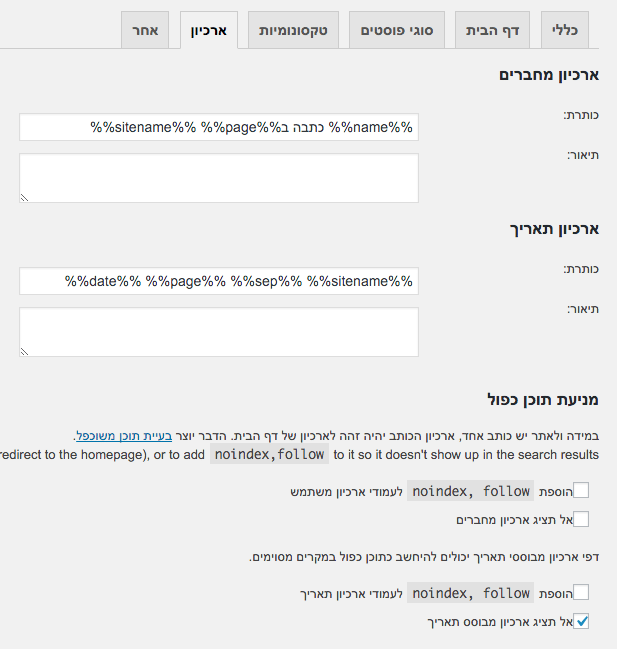
We will use the Yoast plugin to prevent the indexing engine from indexing, or to keep indexing, archive pages that are not attached to our site. We will go to SEO » Titles and meta tags » Archive :
 Original Hebrew WordPress interface. Follow the English instructions in this article; labels and positions may differ in newer versions.
As you can see in the image – the settings shown are the settings for our site's archive, and as can be seen, we completely disabled the the date-based archives, because we do not use them.
Every date-based link will now lead users tothe home page. We left the author-based archives, but we will have to check the box Don't index archive subpages, in the tab SEO » Titles and meta tags » Other, which prevents the display of page numbers such as /page/2/ in archive pages of any kind in search results.
 Original Hebrew WordPress interface. Follow the English instructions in this article; labels and positions may differ in newer versions.
On small sites it may make more sense not to index even the categories and tags, but from our experience it has hardly any effect.
There is one type of archive that is not indexed by default, search results pages. This is also Google's recommendation for working this way. A lot has changed in Google's handling of archives since they expressed their support for links rel=next and rel=prev.
It is worth reading about this topic in depth, but it is a bit too technical for this article; in any case, the Yoast plugin handles all of these changes automatically.
3.2 :: Disabling unused archives
If your blog is a blog of a content writer one, or if you think you don't need it on your blog Author-based archive, it is worth disabling them using the plugin.
In addition, if you think you do not need Date-based archive , so it is worth disabling that one too. Even if you do not use these archives in your theme but have not officially disabled them – someone could still link to them by editing the URL and ruin your SEO continuity.
3.3 :: Numbering and pagination
We want to make sure that if a robot goes to some category page, it will be able to reach all the required pages without running into problems along the way.
Otherwise, if you have a large number of posts in one category – the robot will have to go back 10 pages before it can find one of your amazing posts written earlier.
There is an easy way to get this sorted out; there are several excellent plugins, and we recommend WP-PageNavi, in addition there are themes that allow control over this; usually it will appear under Theme options » Archive content » Numeric navigation.
3.4 :: Canonical links
In February 2009, the major search engines introduced the The rel=canonical element. This is another tool that will help fightDuplicate content.
WordPress has built-in support to canonical links on individual pages and posts, but it still has a few minor bugs. It doesn't generate canonical links on any other page type.
With the Yoast plugin enabled, you automatically get canonical links for every page type in WordPress.
4 :: Site structure for a high ranking
WordPress blogs are built so well for SEO, and search engines are so good at mapping them, because of the structure The categories , the structure of tags, all the pages are linked to one another, and usually the content is neatly and cleanly organized.
But all these advantages come at the expense of something, at the expense of Ranking power of your site, and you will soon understand why.
4.1 :: Pages at the expense of posts
You are probably already asking yourselves why it is better to build pages and not posts?
The first reason is that pages can be direct children of the home page. The second is that in order to maintain the site's ranking, keyword density must be right, and this is where things go wrong,
A post that includes a comments system can ruin the keyword density of a carefully built article / post.
This is why sites that rank high in search engines usually publish their major posts in page format, without comments.
If they want to update the page, they simply update the page and publish a post explaining what the changes to the page are.
4.2 :: New wine in an old bottle
If you have a particular post that has become popular and ranks high, like this page on SEO, for example, you can do the following:
- create a new page with updated and improved content
- to change the address URL short URL of the old post to something like post-name-original.
- Publish the page we created and change the URL shortened URL to the address of the old post.
- Send emails to each of the commenters and explain to them that you improved and updated the content of the page.
- Wait for the links that arrive at the page, again.
- This option of disabling comments and moving to pages improves ranking because it directly affects Keyword density of the site. This function allows you to:
- Full control over Keyword density.
- Even more links in the links to the article and within the article.
- The ability to keep the article up to date as you see fit, to improve its content and its ranking
Some of you developers will say: I can get the same effect by 301-redirecting the old post to the new page. That's true, except that you will lose the comments that users invested a lot of time in writing, and sometimes a 301 redirect takes quite a while.
In general, this technique of splitting into pages should be used carefully; you don't want to do it on all the posts on your site, try to do it only on long articles that in your opinion will accumulate lots of comments and dilute keyword density.
4.3 :: Links to related posts
There is one really good way to let search engines map your site and reach your older posts relatively easily, thereby raising your ranking.
This method works by means of Related posts plugin, this plugin goes deep into your database and pulls out all the posts that were written, and starts linking them to other posts by similar words, meaning it adds links from similar pages.
There is a wide variety of plugins of this kind; we recommend WordPress Related Posts, and of course most plugins offer the option to do this automatically or manually – choosing which pages it appears on and which it doesn't.
4.4 :: Be careful with tags
Lately we have been encountering the "as many tags as possible", perhaps the tags issue makes developers feel that the more tags they add, the more it will promote their site.
So friends, this is really not the case; the tag by itself has no importance at all for SEO. The only way tags affect SEO is the way they link between posts related to the same tag.
or actually a group of posts. There are a variety of plugins that solve this problem easily; if you feel you are already in the situation where your site has too many tags, try reading more atthe next article.
5 :: Mailing list optimization
Find a way to impress your visitors
Many bloggers and sites think there is no need to optimize the form that adds users to the mailing list, and that is a mistake.
One of the most important parameters in mailing lists is location and timing. Which user, in your opinion, will subscribe to your mailing list: a user who reads your blog regularly, or at least not for the first time, and has just finished reading an article on a topic that interests them.
or a user who has just entered your blog for the first time and immediately gets the registration form? Quite right – from our experience, users who read an article and enjoy it will in most cases sign up for your mailing list (it is also important that the registration form be pleasant and attractive).
Another mailing-list trend that attracts users is a weekly email with interesting content on a particular topic, a kind of weekly magazine.
This is why more and more sites and blogs add the mailing list sign-up form at the end of the article: "Did you like this post? Subscribe to our newsletter and get much more!",
and this is the most fitting place to put the signup form. There is another very nice option: when a particular user comments on our blog for the first time, they are redirected to a mailing-list signup form. To do this we will need to use Comment navigation plugin.
6 :: Comments optimization
Keep readers engaged
According to Wikipedia, comments are one of the most important aspects of blogs, quote:
The ability for readers to leave comments in an interactive format is an important part of many blogs.
Comments are not only nice because people write to you about how much they like / appreciate you, or that you made some mistake that needs to be fixed in the post, or anything else they want to write to you.
Most comments are nice because they show a kind of engagement between the blog and the user. And this kind of engagement is one of the most important factors in users recommending your site; they show you they care, they start discussions, and now all you have to do is simply respond, and you begin to build a relationship.
6.1 :: How to get users to comment
The easiest way to get people to do something is simply to ask for it. Write an inviting sentence at the end of the article asking for comments, and ask your readers for their opinion on the subject.
The second way is the link to the comments on your blog. Does your link look like this? "No comments" or like this "Unfortunately there are no comments yet; we would love to hear your opinion on the subject",
Feel the difference? You can change it by editing the file index.php In your current theme, look for the line ()comments_pupup_link and change the text inside the function.
6.2 :: Empower your commenters
Another thing you can do is thank users when they comment on your blog – of course not on every comment, because that becomes annoying.
You can do this only on their first comment on the blog; it can be great. There are various plugins on the subject that send an email to a user who commented right after their first comment, but they are not something stable that we can recommend; you can always try for yourself.
In the plugin Comments navigation that we recommended in section 5, there is an option to redirect the user immediately after their first comment on the site – to the page "Thank you very much" that you will create.
6.3 :: Keeping users in the discussion
Now that users have joined the discussion on your blog, you need to make sure they stay in the discussion and remain engaged. For this case we recommend downloading the plugin Subscribe to comments,
which allows users to stay updated on a particular discussion, just like the option provided in forums, and an email is sent to them when there is a new reply to the discussion.
This way, you can keep the discussion alive, and perhaps the readers who come back will sign up for your mailing list next time.
7 :: The hardest part
If you have completed all the tasks listed above (which is a lot of work, and there is no chance you finished it in a single day), your site has a great chance of becoming successful, especially as a blog and certainly in search engines.
Now the last step sounds easy, but believe me, it's the hardest step in the whole process.
Go out there, and talk to people online.
7.1 :: Keep track of your comments
Be ready at all times to reply to your users' questions with good, content-rich replies, not a reply like "Unfortunately, we are unable to perform this action at this time",
full, substantive replies that will make your users feel respected. In addition, if the commenter filled in their website address in the field intended for it – visit their site and even leave a good comment; this will make them respect you above and beyond.
If you think this is a lot of work, understand that in total 1% of your site's visitors will actually leave a comment. This is a very small group of people – and it needs to be looked after.
7.2 :: Tweet on Twitter
Twitter is a very powerful tool for blogs, chats, updates or whatever you want to call it. Usually you will find only cool people there, and they read tweets more often than they read their emails.
For example, every new article / page / post you publish can be tweeted on your Twitter page. This can bring you a few readers very early after publication, and people will be even happier to respond on Twitter, which may develop into another conversation or two.
8 :: Measurement results
A good campaign relies not only on implementing a number of changes, but also on how much impact those changes have. To test the changes your site goes through, we recommend 2 main tools: Google Analytics and getClicky.
You will find a very wide variety of plugins for both of these tools. You can also measure the results by checking your ranking in search engines; the problem with measuring a campaign's success by ranking is that today most search engines are personalized and vary by location.
In general, the best outcome of a successful campaign is simply broader traffic to your site / blog. Another really excellent tool is Google Webmaster Tools, but we will not go deeper into it in this article; you can find a relevant article on the subject.
9 :: Conclusions about SEO in WordPress
This guide gives you several very important SEO tools for your WordPress site: technical tips, discussion tips, content tips, and many more tips that will help you raise your site in the search engine rankings.
There is always a "but": if you plan to rank for competitive terms or phrases (with high demand), you will basically have to carry out this entire guide meticulously, and produce long, meaningful and persuasive content all along the way.
