
With More than 40,000 plugins available for free to choose from the WordPress plugin directory alone, the feeling you get is just like a child walking into a giant candy store.
Or perhaps you avoid plugins altogether and your way of working is to keep the site with the bare minimum required of plugins?
The first question is: Is there such a thing as too many plugins? And if so, how much is too much? What kind of damage, if any, can be caused by installing a large number of plugins on your WordPress site?
How should you choose the ideal plugins for your site?
In this post we are going to answer these important questions.
Is using WordPress plugins really that bad?
First – The WordPress system works great on its own, but sometimes there is a need for plugins certain plugins if you want to add more features and functionality to the site.
Without plugins – WordPress would be a limited platform in terms of options and functionality. Therefore, choosing the right plugins can play an important role in how your site functions.
Fortunately, thanks to the ever-growing community of WordPress developers, there is an abundance of free plugins to choose from.
By creating these plugins, developers were able to give WordPress users much more control over the performance of their sites and over what they can do functionally and design-wise, all without having to understand a single line of code.
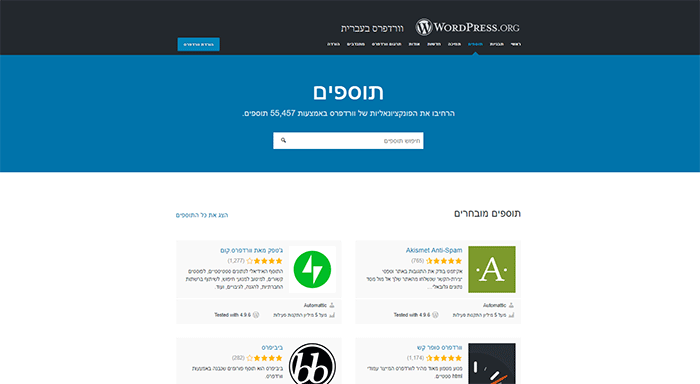 Original Hebrew website example used by this article. The surrounding instructions have been translated into English.
Searching for and installing plugins is becoming simpler and more convenient by the day; at the same time, like anything good in life – plugins also come with problems of their own.
Anyone who has worked with WordPress for a while has certainly run into plugin problems that cause the site trouble in one way or another: pages that load slowly, menu items that disappear, images that fail to load, and so on.
But to what extent do these problems occur because of the plugins you installed? And are these problems related to the large number of plugins you installed on WordPress, or is the cause something else?
How do plugins work?
There are WordPress plugins that affect the part called "Dashboard" (the admin area) of the site, and there are WordPress plugins that affect the "front end" of the site (what visitors see).
Plugins of the "Dashboard" means that they can provide functionality that the site administrator can use (such as statistics analysis, backups or search engine optimization) or that they can add functions to "front end" of the site for the benefit of visitors (such as displaying additional items, widgets or font customization).
Plugins affect site performance in two separate ways:
- Multiple HTTP requests
- Multiple database queries
What are HTTP requests?
Some WordPress plugins (mainly front end) need custom style files or scripts in order to work properly, and therefore these plugins will add JavaScript or CSS additional ones to your WordPress site.
These files are basic additions for changing the visual appearance of your site, and that is in fact their main purpose, but every file you add to your site – including images – creates a new HTTP request.
This means that additional HTTP requests will be sent for every plugin you have installed, which in the end Affects the site's performance and load time your WordPress site.
HTTP operates as a request-response between the visitor and the server: when a visitor arrives at your site and accesses a particular page, the visitor's computer sends an HTTP request to the server for all the files related to the specific page.
Then the visitor's browser retrieves the files received from the server, and receives the file back to the visitor in the form of a web page.
When the requested information is returned by the server to the visitor, it is returned as formatted HTML so that visitors can read and understand it.
The problem with such a process is that the request-fetching operation takes time and thus can slow down the site's speed.
About two years ago saw the release of the HTTP/2 protocol, this protocol is the first significant upgrade of the HTTP communication protocol.
Using HTTP/2 is expected to bring an improvement in your site's speed of yours without any change to your existing code (the setting is done on the server side).
For the full article on the subject The HTTP/2 protocol – everything you wanted to know.
Additional requests from the database
Some plugins may increase the number of database queries that are sent,
on WordPress sites – all the information of your website stored in the database (site name \ site description \ users \ theme settings and more).
If you use a WordPress plugin that stores information in the database – for example, a page / post tracking plugin, additional queries will be sent to the database in order to retrieve and store this information.
These queries will increase the load on your database server and ultimately will affect the site's performance.
Although most plugins that were developed properly will have little impact on your database server load – it is important to decide how important each plugin is to your site if they are plugins that pass information to the database. Especially if your site is hosted on a server with limited resources.
Investing in a quality hosting service – can prevent most of the problems that may arise.
Can too many plugins harm our site?
The million-dollar question: does having too many plugins on your site really cause instability and slowness?
You can find dozens of articles on the subject; some will explain that excessive use of plugins is dangerous and causes slowness / instability, and others will convince you just as well that this is not the case.
and indeed there is no unequivocal answer.
Sites with a large number of plugins – what problems can arise?
This issue depends, of course, which plugins you installed, how many of the plugins are active, how they are coded (the quality of their code), if they work on front end or The dashboard of the site, whether they are based on third-party services that are unrelated to my site, and what is their purpose?
Here are some problems you may experience as a result of choosing the wrong plugins:
Problem #1: Site crash
Even top-tier developers cannot completely prevent problems related to plugins.
Take, for example, WP Super Cache and W3 Total Cache, two of the most widespread cache plugins for WordPress, were discovered as having security vulnerabilities – remote code execution (RCE).
In addition, we have often heard about problems of many site owners who used free WordPress plugins (from the official WordPress plugin directory) with More than 20 million downloads and suddenly turned out as having security vulnerabilities.
The thing is that this is part of the nature of the WordPress community and its desire to remain Open source project.
Since this is a Open-source system that anyone can edit, add to and share (in its original or edited form), you are likely to encounter cases where some component of the system is poorly written and causes malfunctions (in most cases a plugin, but sometimes even in the system's source code). Unfortunately, this is one of the one of the drawbacks of an open-source system.
Because of such cases and because of the seemingly infinite number of free plugins, not to mention all the commercial options available, people tend to be concerned about the performance, security and reliability of their site when it comes to using plugins.
Problem #2: Site performance and speed
When it comes to performance, the most important thing is site loading speed. Naturally, the more that are installed on your site, more plugins on the site – the more direct the impact will be a direct impact on your site's load speed.
Remember that for every plugin in use, an HTTP request is sent an HTTP request to the server for each visitor the site visitor; this causes code to be added to the browser every time one of the site's pages is loaded and can affect the site's load speed.
If the plugin relies on libraries and files that are loaded from external servers (for example, a plugin that lets you add icons to a menu and is based on the icon library of Font Awesome) – keep in mind that your site's loading speed depends directly on the server from which the icons are loaded (usually it will be cdn.fontawesome.com), so if their server is under heavy load due to overuse – it will affect the site's loading speed without updating anything on your site.
Another concern is compatibility of several plugins installed on your site, Plugin conflict is not a rare occurrence, and it can cause problems, from slowing down the site to crashing the entire site.
For example, Using multiple caching plugins at the same time will cause cache to be created in a double and triple manner, each of the cache plugins will save the cache based on information it received after minifying and reducing Html / CSS / JavaScript, and will try to perform the operation again – this will cause slowness and damage to the site's display.
Another example is Using several plugins to minimize image weight, such as tinypng and wpsmush, such a case can cause an error when uploading new images to the site following an attempt by each of the plugins to minimize the image (one after the other) and cause an infinite loop of minification attempts.
Problem #3: Security vulnerabilities
Your site's security must be of high importance to you; you would not want to see all the hard work you invested destroyed by a hacker.
Every time something like this happens, the reputation that you earned and worked hard for can get lost overnight, businesses can be badly affected by this, not to mention the effort and time required to recover from such an attack (after search engines have identified your site as harmful).
From time to time you come across "premium" plugins Premium" that customers find across the web (usually on download sites) and install on their site. It is very important to avoid this: download plugins from the plugin developer's original site The plugin and keep regular updates.
Problem #4: Reliability issues
Another major problem for WordPress users and the desire to install a large number of plugins is their reliability.
Possible problems with plugins you download can be poor code quality, plugins that have been discontinued, plugins that are rarely updated, and a low level of support.
All these reasons together can and should make you think twice before installing any plugin, which in the end can bring more harm than good.
How do you avoid plugin problems?
True, it seems that quite a few problems can be caused by installing multiple plugins on your site, but!! with proper, careful planning that includes tips from experts on the subject, you can easily prevent problems while still getting the maximum out of the WordPress system and your plugins.
So here are a few tips that will help you avoid and overcome the problems related to using plugins:
Solution #1: Avoid installing plugins with identical uses
Before you think about installing a new plugin – it is very important Check your existing plugins, whether the features you need already exist in one of your plugins?
When you are aware of the full features of your existing plugins, you can easily avoid installing duplicate plugins that perform the same actions.
Solution #2: Dealing with a slow site
Some claim that a large number of active plugins can slow your site down significantly.
This is why installing a cache plugin such as WP-Rocket is highly recommended.
When your site's speed slows down as a result of installing a large number of plugins – Using a caching plugin takes the files that the server requests (HTTP requests) and passes them on to visitors as a static request.
This way your site will load files that are stored statically and closer to your server, which helps reduce processing load on your server and as a result significantly improve the site's performance and speed accordingly.
Solution #3: Run performance tests for the plugins on your site
Another advanced option is to test your site's loading twice, before and after installing a plugin you are interested in.
A good tool for this purpose is Speedom, which runs a speed test on a site and provides technical information about our site, the HTTP requests, the response time and additional data.
After entering the site, simply enter your site's address and you will receive a list of suggestions for how to improve your site's speed.
Measuring your site's speed before and after installing the plugin will help you understand how the plugin affects the site's overall performance.
Solution #4: Security
Security issues are something to take seriously every time you use any kind of system, regardless of whether it is on your site or not.
While the WordPress core is very secure and regularly updated to address security issues, all that is needed is "One bad plugin" in order to make the site hackable.
The fact that a plugin on your site works properly does not mean your site is not exposed to security vulnerabilities – which is also why it is very important to have backups of the site.
It is very important to update all the plugins you own, using updated versions will reduce script conflicts (which affect your site's performance) and will reduce the chances of your site being vulnerable.
It is recommended to use only plugins that are compatible with your WordPress version, under the dashboard of your site – in the plugin management screen you can see a warning about plugins that have not been tested with your WordPress version.
Choose your plugins wisely
It is very easy to get carried away and install as many new plugins as possible on your site, a plugin for every feature or display change we want to add.
We have collected for you a list of A few tips that can significantly reduce the negative impact of plugins on your site:
- How many plugins are too many? In most cases the problem is not the number of plugins but in the quality of their code.
- Check who the plugin's developer is – it is recommended to look for plugins developed by well-known developers in the WordPress community in order to prevent problems.
- Star ratings, User reviews and support forums are the best places to get insight into how the plugin works for others.
- Take into account the user experience of your customers, will the plugin be a convenient solution, or will it complicate their use of your site?
- Delete plugins that are not in use, they constitute Security vulnerability and affect your site's performance .
- Check the the latest version, the number of downloads and the number of active installations. A reliable, established plugin is updated regularly and has high download statistics.
- Avoid downloading Free "premium" plugins that are found across the web; they usually contain Security vulnerabilities.
- Always keep all your plugins up to date.
In summary:
Using plugins is part of the secret magic of WordPress.
It contains many ready-made solutions for simple users and very advanced developers who are looking to save development time, or simple ready-made solutions for users who don't know how to develop on their own,
That said, the use of plugins should be focused and careful while adhering to the variety of tips and advice we reviewed in this article.
It is important to identify your site's real need and whether the solution for it is a new plugin or a custom solution, remember that keeping a large number of plugins directly affects the site's loading speed, the number of HTTP requests, server performance, and the level of vulnerability of WordPress to various security problems.
And therefore our recommendation is minimize the use of plugins as much as possible to the minimum required number, and always keep your finger on the pulse regarding when performing upgrades and a comprehensive check that the plugins on your site are not ones that have been "abandoned" by their developers and left behind in terms of security.
