Recently, in the support department we have been exposed to many inquiries concerning mail servers and how they operate.
In this article we will explain several general concepts and several methods in email and domain workflows that will help us understand the topic. Shall we begin?
What is a mail server and how does it work?
A mail server is a server that hosts and transfers email messages across the network.
A mail server can receive mail fromEmail client and forward them to other mail servers. In addition, a mail server can forward email to other mail clients.
Email client is a simple computer on which software is run that is used to read email, for example: a mail client can be your computer at home or in the office on which email management software is installed, or your mobile phone with an email management app.
What is the difference between an outgoing mail server and an incoming mail server?
Outgoing mail servers
An outgoing mail server is used to send email between different servers until it reaches the destination server, but it does not allow the user to retrieve the messages intended for them from the server.
This type of server is responsible only for sending messages. The most common protocol for sending email today is – SMTP.
The SMTP protocol
Simple Mail Transfer Protocol (abbreviated: SMTP, In free translation: a simple protocol for mail transfer) is the standard protocol for sending email over the internet.
Once an email is sent by the mail client you use (the software or system that manages the mail, for example Outlook) – it is sent to the outgoing SMTP mail server; usually this server will require authentication with a username and password in order to actually send the email as a particular user (the "from" address the message will be signed with).
The common ports for using SMTP servers are: 25, 465, 587
Incoming mail servers
An incoming mail server is used to receive email messages between different servers; this type of server is responsible only for receiving messages.
The most common protocols for receiving email today are – POP3 and IMAP.
POP3 protocol
Post Office Protocol version 3 (or, in short, POP3) is a protocol for retrieving email messages from a remote mail server.
In recent years, almost all email service providers use POP3, and the term POP became synonymous withPOP3.
Working with this protocol is usually suited to a primary work mail client that pulls all mail messages from the mail server to the client (it can be mail management software such as Outlook, or a Gmail account), and after a short time they are completely deleted from the mail server, freeing up space on it.
That is – all email messages will, within a certain period of time, be moved to the mail client and deleted from the server. In such a case a mailbox with an especially large capacity is not required, because mail is cleared from the mail server. All of the message history is kept in the mail client only.
The common ports for POP3 servers are: 110, 995
IMAP protocol
Internet Message Access Protocol (abbreviated: IMAP) is a protocol that allows access to email located on a remote mail server.
While the POP3 allows the user to work with only one mail client (messages move from the server to the software that manages the mail and are deleted from the server), the advantage of the protocol IMAP It can work with several email clients at the same time, while the email messages remain stored on the mail server.
For example, you can connect 3 different mail clients (Outlook on the office computer, Outlook on the home computer, a mail app on the mobile device), all of them accessing the remote mail server and performing actions directly on the server (deleting mail, moving between folders, marking mail as read / unread).
Using this protocol – essentially, all email messages are permanently kept on the mail server. The protocol's notable drawback is the difficulty of moving between hosting servers (if the mail server is your hosting server): when moving between mail servers, all the mail messages stored on the previous mail server must be transferred.
The common ports for IMAP servers are: 143, 993
DNS records
To pass email messages between the different mail servers, in DNS records that define for each domain who it may send emails as, and who its mail server is (where to direct incoming email messages),
For this purpose we use the 2 common DNS records: the record MX and SPF.
MX servers
An MX record contains the address of the server used by the domain to receive email (incoming mail server),
When another mail server tries to send an email to our domain address (for example: nati@upress.pro), the server attempting to send the email checks the MX record on the domain upress.pro, and sends the email messages to the mail server responsible for receiving mail for that domain (according to what is written in the MX).
SPF records
An SPF record is a special type of TXT record that specifies the names of the Hosts which are permitted to send mail on behalf of that same domain.
This is actually a record that verifies that you indeed own the domain, and specifies which IP addresses or mail servers are allowed to send emails under your domain. (To prevent forgeries of mail sent "from" another person's address)
How do I create a mailbox with my domain extension?
1. The mail servers of inbox.co.il
The first option is to create mailboxes under the inbox.co.il mail server; mailboxes opened through the inbox service are configured automatically through the uPress hosting interface. Also, at the bottom of the management page you can find all the information about server details and the required technical information.
Also – at the bottom of the management page you can find all the information about server details and required technical information.
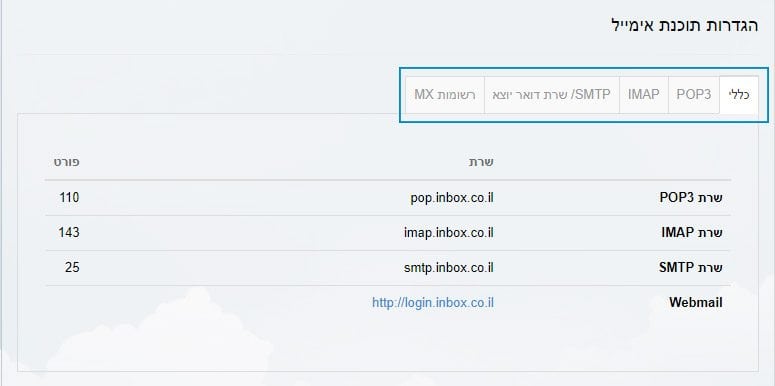 Original Hebrew uPress control panel. Follow the English instructions in this article; labels and positions may differ in the current interface.
uPress customers: You can create an unlimited number of mailboxes, with each mailbox limited to 500MB of disk space (there is an option to upgrade for an additional fee).
Once you sign up for this service through the uPress management interface, the MX and SPF records will be set up automatically in the DNS management, so you will not need to worry about it. (If the DNS is managed on uPress servers by pointing an NS record and not an A record).
2. External mail servers
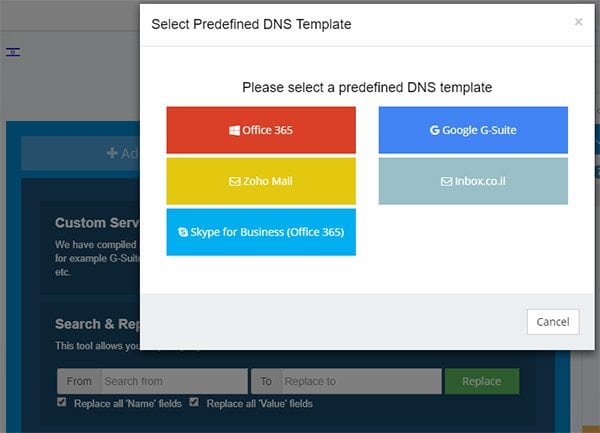
Another option is to set up external mail services on the domain that do not depend on the hosting server, such as Google G-Suite, Office 365, Zoho Mail and more.
The advantage of using services of this type is cloud storage space (of the external mail service) that does not take up storage space on the SSD drive that is supposed to serve our site, and the ability to switch between hosting providers without changing settings in the mail software at the offices / without losing email availability for several hours / days, and without creating all the mailboxes again and again.
Usually – these services provide several DNS records that we will need to set up under the DNS management interface (which manages the domain).
uPress customers: you can find fast loading of a variety of email services, at the click of a button (under the DNS management interface > DNS Tools tab).
Once you sign up for this service through the uPress management interface, the MX and SPF records will be set up automatically in the DNS management, so you will not need to worry about it. (If the DNS is managed on uPress servers by pointing an NS record and not an A record).
Important note: the entire subject of managing email accounts / email forwarding / receiving and sending mail will be managed through the external service only.
I have a mailbox; how can I use it?
I have a mailbox hosted on some mail server (by our choice; the default is inbox.co.il), and now we want to start sending and receiving emails.
Great. How do we do it? Using some email client (of our choice):
- A mail client can be your computer at home or at the office on which software for managing email is installed (for example Outlook, Apple Mail, Thunderbird)
- A mail client can be a website run by the browser that manages email online (for example the Gmail interface, the inbox.co.il interface)
- A mail client can be your mobile phone with an email management app (for example Outlook Mobile, Android Mail)
Clarification: a mailbox is an account that exists under some email service, and the email client is our way of communicating with this mailbox and managing it.
For illustration: we have a bank account whose job is to manage our money, we communicate with this account using an ATM to withdraw money, and using other tools to deposit money. In the future the ATM may be replaced by newer technology, and we will be able to deposit money in new ways – But the account that exists in the bank remains the same account and does not change.
Just like in the example, today we can use an Outlook-type mail client, tomorrow connect to a web-interface mail client such as inbox.co.il, and two days later install an app-type mail client on our mobile device. These are different types of mail clients that communicate with our mailbox (that exists in only one place).
Different types of email clients and how to set them up
- A guide to creating a mailbox under the inbox services and how to set it up in the email client (as we choose)
- A guide to setting up a mailbox in Outlook
- A guide on how to set up a mailbox in the Gmail web interface (POP3 protocol only for an incoming mail server)
- Web interface for managing a mailbox in inbox.co.il services (you must enter an email address and password)
In summary
In this article we tried to explain a number of general concepts and a number of methods in email and domain workflows that will help us understand the subject more clearly,
We explained What is a mail server and how does it work, what the differences are between outgoing mail server and incoming mail server, what are The protocols commonly used (SMTP, POP3, IMAP), which DNS records DNS records need to be added to verify that the mailboxes indeed belong to us and are sent from our server and at our request, what are The common email services to use (inbox.co.il, Google G-Suite, Office365, Zoho Mail) and how they can be managed using an email client.
We hope we managed to do this in the clearest and most understandable way. We would love to hear your opinion in the comments, and of course to answer questions.